

Statistics and graphs Live, research beta
Statistics with the working shown.
Plotvera takes a data table to an analysis and a graph in your browser, and records the method, options and version beside every result.
- 8table formats, from column and XY to survival and nested
- 46analyses in the analysis menu
- 20built-in curve models, plus your own equations
- 5export formats: SVG, PNG, TIFF, PDF and PowerPoint
TourFigure 2, panels a to e
One example, start to finish.
Start from a table that fits the experiment.
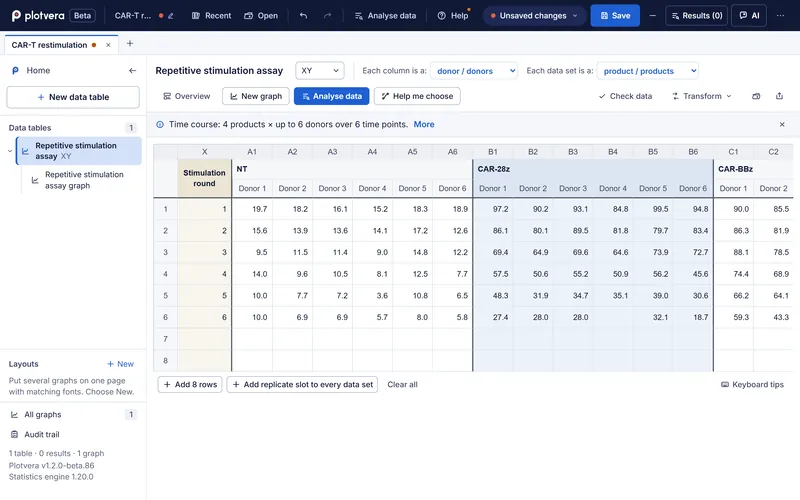
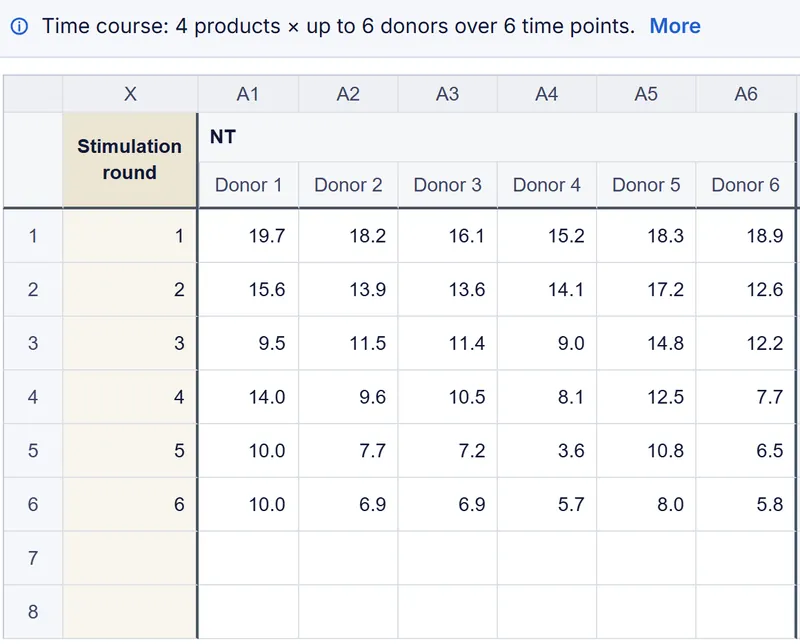
Column, XY, grouped, survival, contingency, nested, parts of whole and multiple variables. Type, paste, or open a CSV, Excel or Prism file. Plotvera reads the layout back to you: here, four CAR-T products, up to six donors each, over six stimulation rounds.
Full screenshot
It suggests an analysis, and says why.
Plotvera reads the design of the table and recommends a method with its reasons in plain words. Here it suggests a mixed-effects model, because donors were measured repeatedly and one time point is missing, so no donor is dropped. You can pick another; each option is explained alongside.
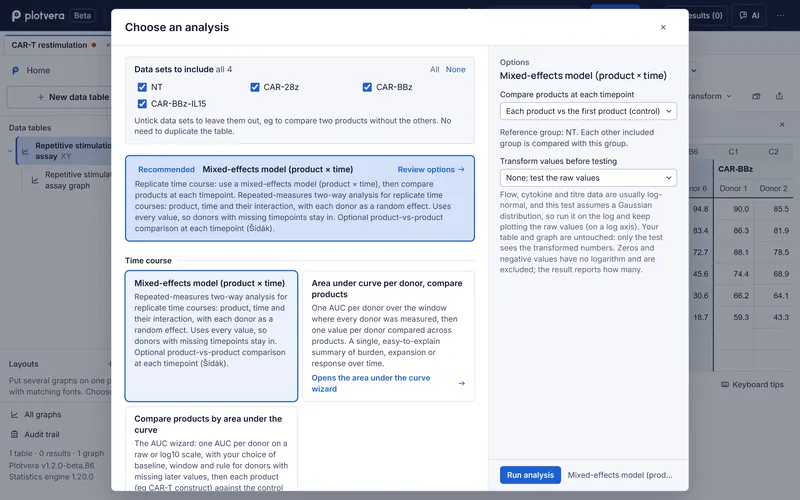
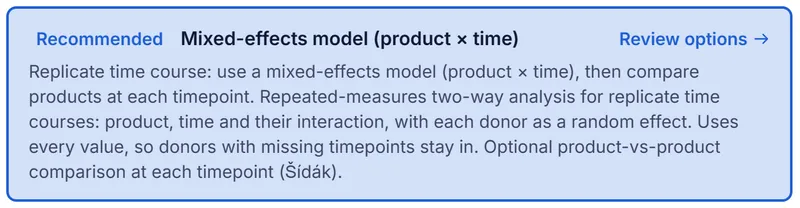
Recommended: mixed-effects model (product × time)Replicate time course: use a mixed-effects model (product × time), then compare products at each timepoint. Repeated-measures two-way analysis for replicate time courses: product, time and their interaction, with each donor as a random effect. Uses every value, so donors with missing timepoints stay in. Optional product-vs-product comparison at each timepoint (Šídák).
Full screenshot
The answer in a sentence, the model in full.
A plain-English summary sits above the model description and the fixed-effects table. Every result keeps a record of the method, options, version, build and a fingerprint of the data, and you can export that record as JSON.
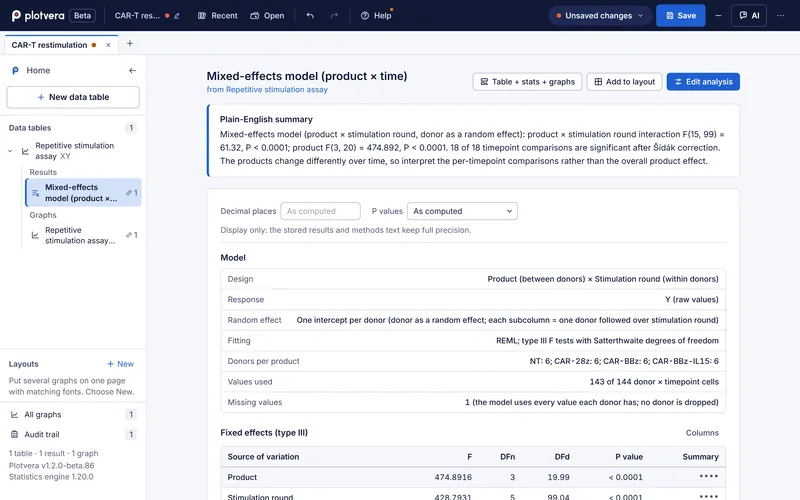
Plain-English summary, as Plotvera wrote itMixed-effects model (product × stimulation round, donor as a random effect): product × stimulation round interaction F(15, 99) = 61.32, P < 0.0001; product F(3, 20) = 474.892, P < 0.0001. 18 of 18 timepoint comparisons are significant after Šídák correction. The products change differently over time, so interpret the per-timepoint comparisons rather than the overall product effect.
Full screenshot
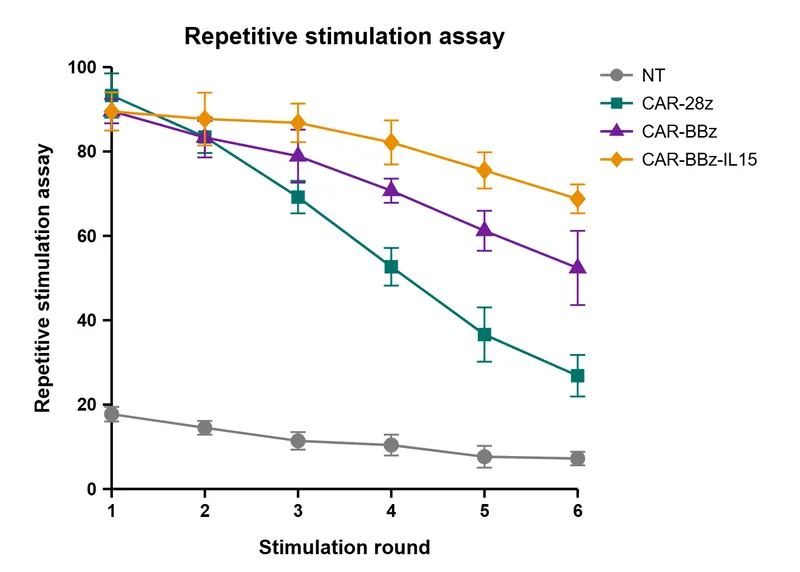
A graph straight from the result.
Scatter, bar, box, violin, XY, survival, heatmap, ROC, forest, volcano and more, formatted in place. Export SVG, PNG, TIFF, PDF or PowerPoint at exact physical size and resolution, or lay several panels out at Nature or Cell column widths. Check your target journal's own requirements.
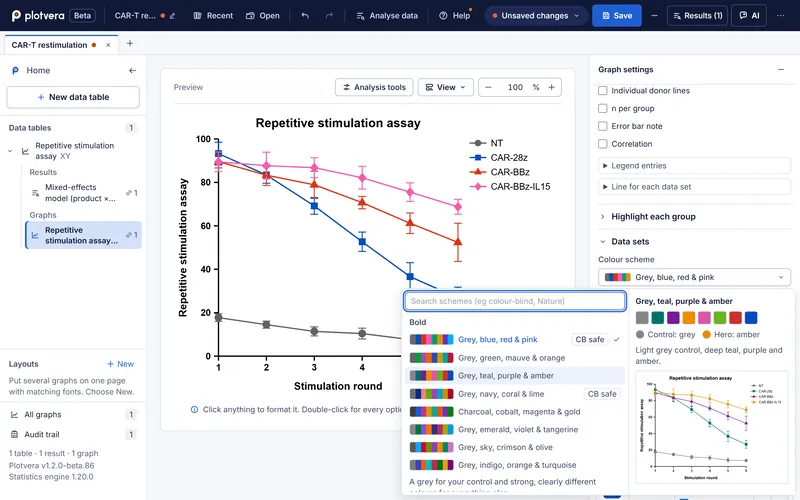
Restyle without starting again.
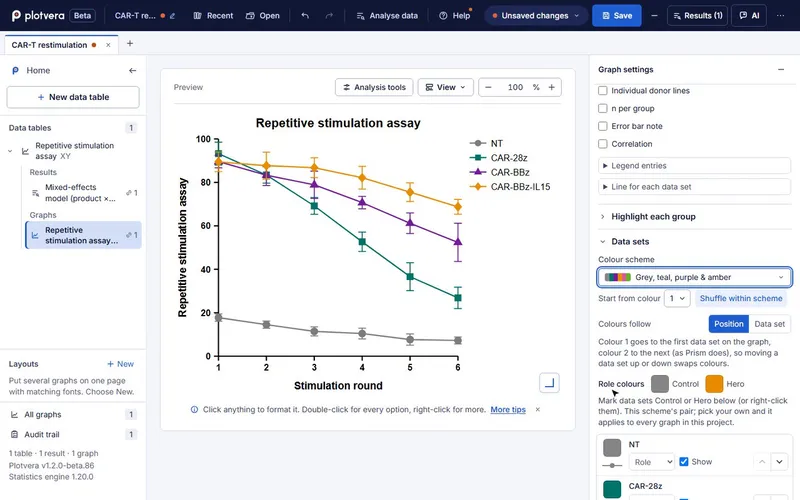
Colour schemes are tagged when they are colour-blind safe, and the preview updates as you hover. Mark a control and a hero group once and every graph in the project follows. The graph view also opens at phone width.
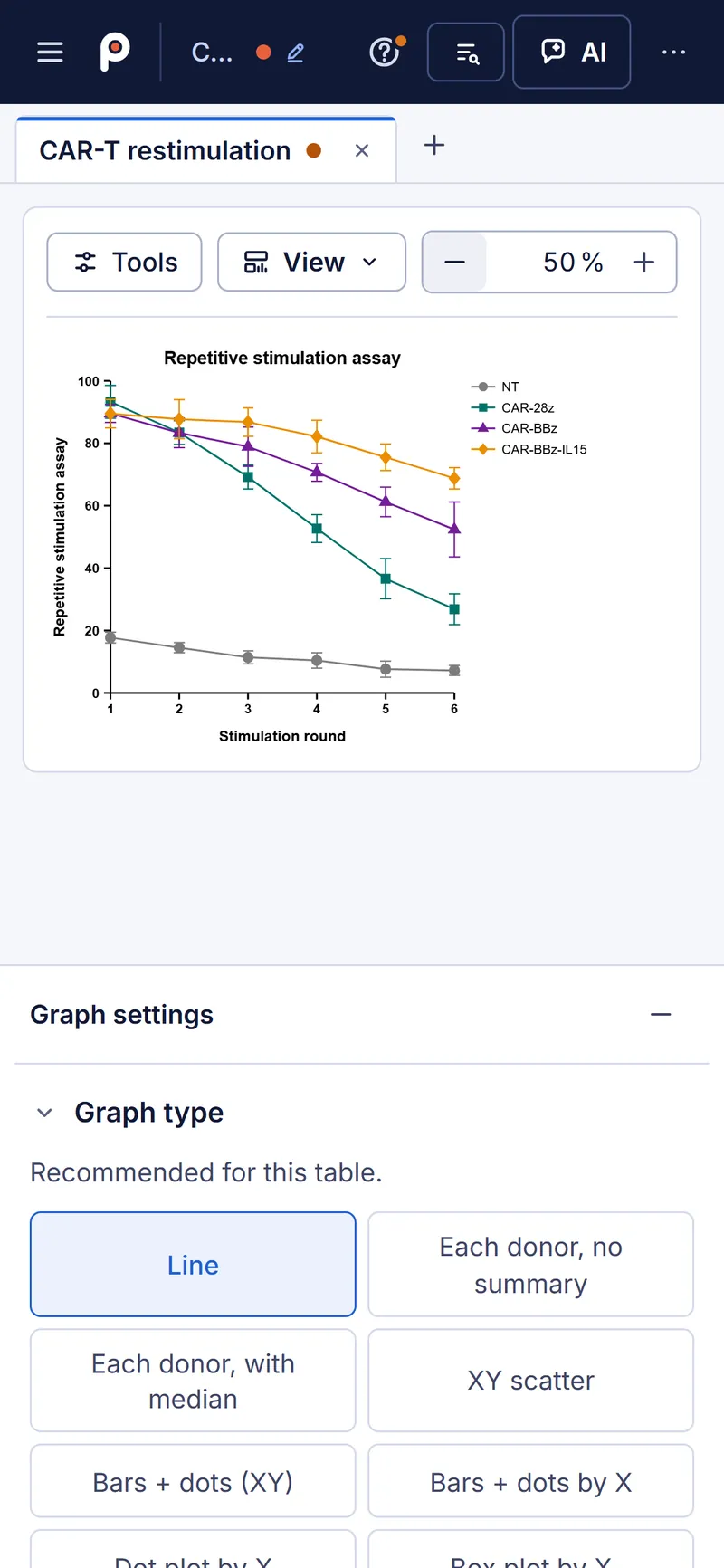

Full screenshot
Figure 2 | A repetitive stimulation assay in Plotvera. a, XY table, four products by six donors by six rounds. b, the analysis chooser with its recommendation and reasons. c, mixed-effects results (product by round, donor as a random effect). d, the line graph, mean and error bars per product. e, the colour scheme picker. Outlined boxes mark the area enlarged or quoted. Screenshots of Plotvera 1.2.0-beta.86 on plotvera.app, cropped, otherwise unretouched.
Opens your Prism filesPrism 10 and later
Bring the projects you already have.
- .prismPrism 10 and later
- .pzfxplain-text Prism
- .pptxPrism graphs pasted into PowerPoint
- .csvand Excel .xlsx
Plotvera opens .prism files from Prism 10 and later, plain-text .pzfx files, and the Prism project that travels inside a graph pasted into PowerPoint. Before anything opens, a preview lists what will carry over and what will not.
- Source tables, titles and labels, subject IDs, graph family, axis settings and Prism layout pages.
- Stored analyses are not rerun: you choose them again in Plotvera, which suggests one.
- Graph styling is rebuilt in Plotvera, so it will not look identical. Legacy .pzf files are not opened.
- Saving for Prism writes data tables only, and those files have not yet been opened in GraphPad Prism.
Evidenceaudit of 11 Oct 2026
Compared with R and NIST, misses included.
App shown: 1.2.0-beta.86; live: 1.2.0-beta.87; reference cases from the 11 Oct audit of 1.2.0-beta.57; capability table from the 21 Oct release 1.2.0-beta.85.
- 676 within tolerance
- 39 hard nonlinear NIST cases that do not converge: Plotvera says so rather than report a wrong fit
The Plotvera validation report lists each method, its reference and its tolerance, including the cases that do not pass. Check a result you know before you rely on Plotvera for one you do not.
Every method carries a status
The same four words are used in all four Anaphase tools. No Plotvera method is marked Supported yet: all 46 analyses are Implemented with validation partial, or Partial, and the app labels each one. External statistical review is still to come.1
- SupportedEvery evidence category met and owner-approved. None yet.
- ImplementedAvailable, with automated checks; validation partial.
- PartialAvailable, with named gaps.
- Not supportedAbsent, and we say so.
Plotvera beside Prism, workflow by workflow
Status words are Plotvera's own, from its capability matrix. The gaps column names what Plotvera's documents say is incomplete; it does not count Prism features.1
| Workflow | Status | Plotvera has | Named gaps |
|---|---|---|---|
| Column tables, descriptive statistics | Implemented | Mean, SD, SEM, median, quartiles, CI, frequency distributions | Output-by-output and failure-path evidence incomplete |
| One- and two-group tests | Implemented | One-sample t and Wilcoxon, unpaired, Welch, paired, Mann-Whitney, matched-pairs Wilcoxon | Not every method meets the full evidence standard |
| One-way comparisons | Partial | ANOVA, repeated-measures ANOVA, Kruskal-Wallis, Friedman | Multiple-comparison families limited; planned-pair and trend workflows not complete |
| Two-way comparisons | Partial | Ordinary and repeated-measures two-way ANOVA; mixed-effects model and AUC per subject for replicate XY time courses | General N-way and general mixed-effects models not present |
| Nested data | Implemented | Nested t test and one-way nested ANOVA | Equal technical-replicate counts required |
| Linear regression, correlation | Implemented | Pearson, Spearman, ordinary linear regression | Deming, equivalence and robust regression not complete |
| Nonlinear regression | Partial | Selected built-in biological models and custom equations, up to 20 fitted parameters | Global fits, robust loss, profile-likelihood intervals not complete; 39 NIST cases not matched |
| Survival | Partial | Kaplan-Meier with censor marks, bands and risk table; log-rank, Gehan-Breslow, two-group Cox | Stratified and time-varying Cox, proportional-hazards diagnostics open |
| Contingency tables | Partial | Chi-square and 2 × 2 Fisher | Larger-table exact and Monte Carlo methods unavailable |
| Graphs | Implemented | Scatter, bar, box, violin, XY, survival, heatmap, ROC, forest, volcano, histogram, bubble; statistics on the graph | Not every chart and export combination has automated coverage |
| Export and layouts | Partial | SVG, PNG, TIFF, PDF, PowerPoint at exact width and DPI; multi-panel layouts with panel letters | CMYK, batch export, journal preflight, PDF tagging not done |
| Open .prism and .pzfx | Partial | Source tables, subject IDs, graph family, axes, layout pages; preview before open | Stored analyses not rerun; pixel styling not matched; legacy .pzf rejected |
| Write files for Prism | Partial | Data tables only: values, titles, labels, subject IDs | No graphs, analyses or styling; not yet opened in GraphPad Prism |
| Assistant and connector | Research beta | Offline helper; your own key; connector to your own Claude or ChatGPT | Not a statistics method; analyses run in Plotvera's engine |
| Collaboration, power, public API | Not supported | None | Share links are copies, not shared workspaces; power is planned |
AI and connectorsthree routes, none required
Ask for help, keep the statistics.
- No key
Offline helper
A built-in helper that works without a key or an AI provider.
- Your own key
Assistant
Use your own Anthropic, OpenAI, OpenRouter or other provider key; you pay the provider directly. Requests pass through Plotvera's server, which relays your key to the provider and is not designed to log or store it. They carry your question, sheet and column names, a bounded sample of the selected table, summaries, what is selected on screen and your settings; other tables only when the assistant reads them with a tool you can see. The AI disclosure has the full list.
- Works today
Your Claude or ChatGPT
Plotvera's connector lets your own Claude or ChatGPT read your tables, recommend and run an analysis with the test, n and correction shown, and make or change graphs.
- In Plotvera, click Connect Claude / ChatGPT in the assistant panel.
- Paste your personal link into claude.ai, Claude Desktop, Claude Code or ChatGPT developer mode.
- Keep the Plotvera tab open, and ask.
Try askingRecommend a test for the open sheet and run it.
Every change shows in Plotvera with an Undo button, and anything destructive waits for your yes. Set-up details.
The AI does not do the statistics. Analyses always run in Plotvera's own engine. AI suggestions are drafts for you to check. A hosted assistant is planned and not yet available.
Limitationswhat it does not do yet
Every paper has a limitations section. Here is ours.
- No online collaboration. A cloud share link is a copy, not a shared workspace.
- No sample-size or power calculations yet.
- Nonlinear regression is partial: global fits, robust loss and profile-likelihood intervals are not complete.
- Journal preflight and CMYK output are not complete.
- Exact tests for contingency tables larger than 2 × 2 are not available.
- No public analysis API.
Where your data goes. Your project stays in this browser unless you choose cloud share, an AI request or the Claude and ChatGPT connector, and it saves to a .plotvera file you keep. Plotvera loads no analytics and no remote fonts. Browser storage is not encrypted by Plotvera, so do not use it for patient-identifiable data.
Questionsbefore you open it
Frequently asked questions.
Is it free?
Yes, during the research beta, with no card. Draft prices for paid plans start at £99 a year for one academic seat. They may change and there is no checkout yet. Draft pricing.
Will it open my Prism projects?
It opens .prism files from Prism 10 and later and .pzfx files, and shows a preview of what carries over before anything opens. Analyses stored in the file are not rerun automatically; Plotvera suggests one for each table.
How far can I rely on the statistics?
Plotvera is compared with R and NIST reference values with published tolerances, and lists the cases it does not match. No method is marked Supported yet. Treat it as you would any new tool: check a result you know before you rely on it.
Where does my data go?
Your project stays in your browser unless you choose cloud share or an AI request. Cloud share links are kept for 30 days by the provider on the sub-processor list. Plotvera loads no analytics.
Do I need to install anything?
No. Plotvera runs in a current desktop browser, and the graph view also opens at phone width. Projects save to a .plotvera file you keep, and up to 12 projects can be open as tabs.
Can I use it for clinical work?
No. Plotvera is a research beta, for research use only, and not for clinical, diagnostic or treatment decisions.
References
- Plotvera capability matrix and validation manifest, release 1.2.0-beta.85, 21 October 2026: supported none, 46 analyses Implemented or Partial, 20 nonlinear models.
- Plotvera validation audit, release 1.2.0-beta.57, 11 October 2026: 715 reference cases against R and NIST, 676 within tolerance, 39 NIST limitations listed. Reference sources and tolerances are in the app's validation report.
Try it on your last experiment.
Open the CAR-T example, or paste in a table of your own and see what Plotvera suggests.