

Flow cytometry Live, research beta
Gate in the browser. Read the counts as you draw.
Gatecraft opens FCS files and FlowJo workspaces, compensates, gates and reports population statistics in one window, and FCS event data is processed in your browser, not uploaded.
- 5gate shapes: rectangle, polygon, ellipse, quadrant and interval
- 4axis scales: linear, log, biexponential and arcsinh
- 5statistics per population, recomputed as a gate moves
- 4export formats: CSV, Excel, TSV and Prism-format tables
TourFigure 2, panels a to d
One PBMC file, gated start to finish.
Draw a gate, read the count at once.
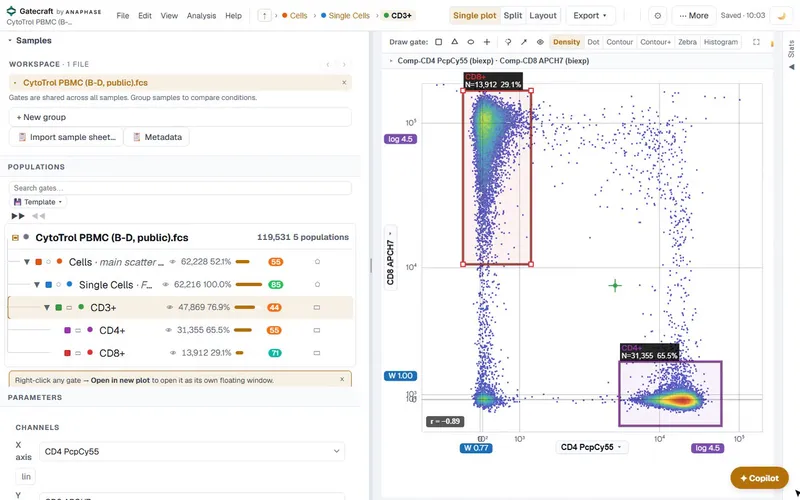
Open an FCS 3.0 or 3.1 file and plot any two channels, each on its own scale. Draw a rectangle, polygon, ellipse, quadrant or interval gate with a single-key shortcut, and the gate label shows its event count and percentage while you drag. Here, CD3+ T cells gated on single cells.
The gate label, as Gatecraft drew itCD3+ N=47,869 76.9%
Comp-CD3 V450 (biexp) against SSC-A (linear), within Single Cells.
Full screenshot
Double-click to go in, and gate again.
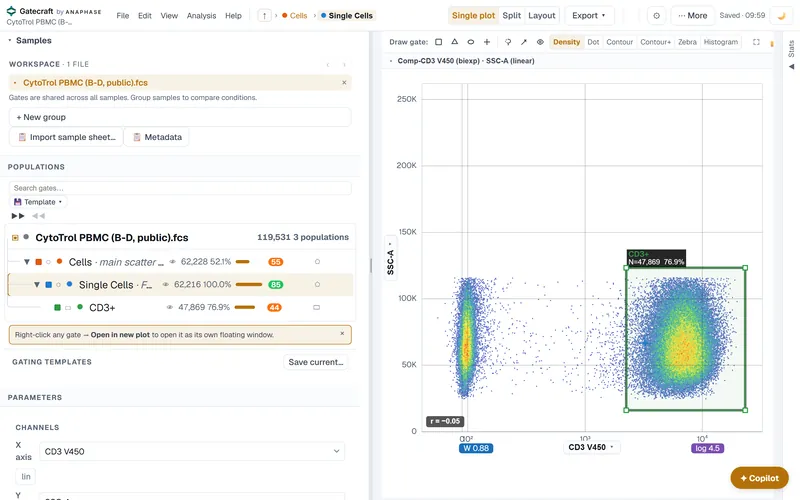
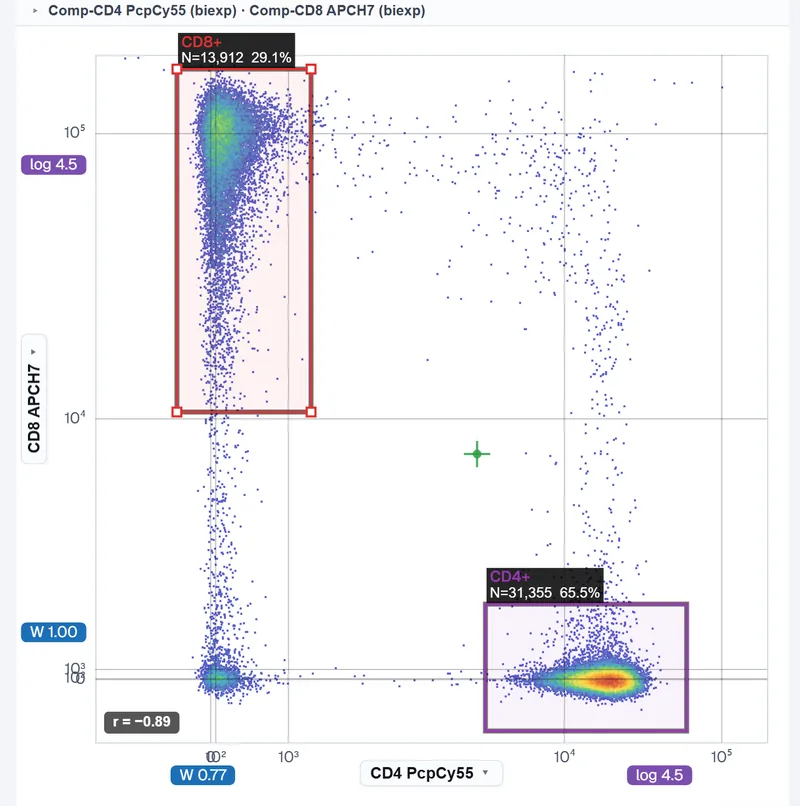
Double-click a gate to descend into it. Within CD3+, CD4 against CD8 separates the two T-cell subsets: 65.5% CD4+ and 29.1% CD8+ of CD3+ cells, each gate labelled with its count as it is drawn. Gates have handles, can be nested and reparented, and are shared across every sample in the workspace.
The whole hierarchy, counted.
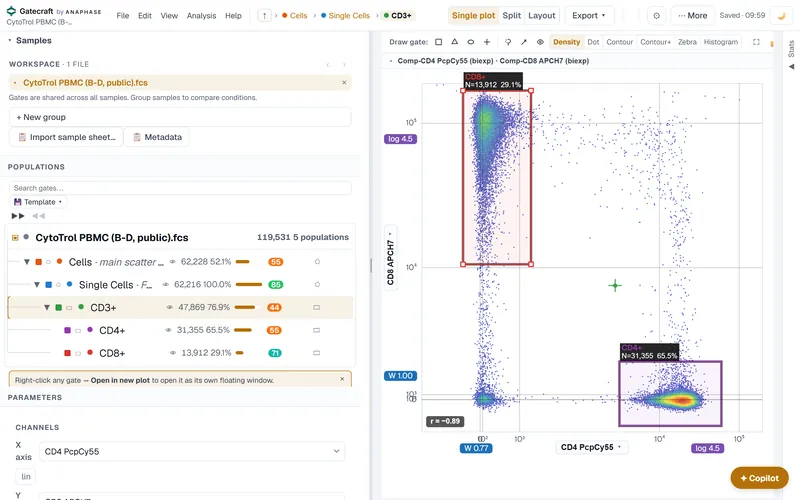
Every population keeps its ancestry, so each count is computed from its parent's events. The tree shows events and % of parent for every gate; the statistics also give % of total, MFI and CV. Search or hide gates, and save the gating as a template for the next file.
The population tree, as Gatecraft shows it
Population Events % of parent CytoTrol PBMC (B-D, public).fcs 119,531 Cells 62,228 52.1 Single Cells 62,216 100.0 CD3+ 47,869 76.9 CD4+ 31,355 65.5 CD8+ 13,912 29.1
Full screenshot
Statistics out, ready for the graph.
The statistics table gives one row per sample with the counts and percentages you choose. Copy it for Excel, download a CSV or TSV, or export a Prism-format table. A worksheet view lays the plots out for a report, painted by population.
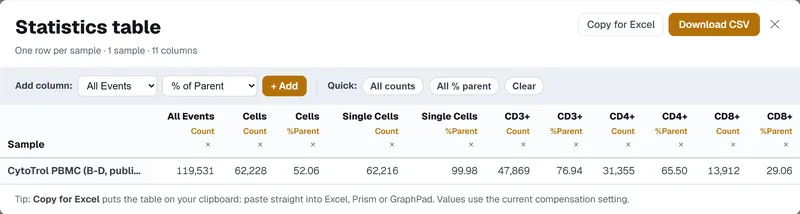
Statistics table, one sample, as Gatecraft shows it
Population Count %Parent All Events 119,531 Cells 62,228 52.06 Single Cells 62,216 99.98 CD3+ 47,869 76.94 CD4+ 31,355 65.50 CD8+ 13,912 29.06
Figure 2 | A public PBMC file gated in Gatecraft. a, CD3+ gated within single cells, Comp-CD3 V450 against SSC-A. b, CD4+ and CD8+ gated within CD3+, Comp-CD4 PcpCy55 against Comp-CD8 APCH7, biexponential scales. c, the population tree with events and % of parent. d, the statistics table for the sample. Outlined boxes mark the area quoted. Data: the B-D CytoTrol PBMC file, public through the Bioconductor package flowWorkspaceData.3 Screenshots of Gatecraft 1.0.0-beta.2 on gatecraft.bio, cropped, otherwise unretouched.
Opens FCS files and FlowJo workspacesFCS 3.0 and 3.1, FlowJo .wsp
Open a FlowJo workspace, then check the counts.
- .fcsFCS 3.0 and 3.1
- .wspFlowJo workspace
- .csvstatistics out, and TSV
- .xlsxstatistics out for Excel
Gatecraft reads FCS 3.0 and 3.1 files with float32, float64 or integer data, and opens FlowJo .wsp workspaces. Drop a workspace in with its FCS files and Gatecraft maps the gate tree onto the matching file, using the workspace's own spillover matrix.
- The gate tree, mapped onto the matching FCS file, with the workspace's compensation.
- On the one 13-colour workspace we compared, 775 of 898 gate counts came within 1% of the counts FlowJo stored.2
- The other 123 differ by 1 to 7%, mostly small quadrant populations, from how gate boundaries are included and float32 rounding.
- That is one workspace and our own harness. Check the counts that matter against your own analysis.
Evidenceour own check, June 2026
Compared with FlowJo's own counts, misses included.
App shown: 1.0.0-beta.2; live: 1.0.0-beta.3; FlowJo comparison from June 2026; capability table from the 11 Oct dossier (commit dd8dce9).
- 775 within 1% of FlowJo
- 123 differ by 1 to 7%, mostly small quadrant populations
This is our own comparison, not an independent validation. Counts, transforms, compensation and MFI have not yet been compared with FlowJo or openCyto beyond this one workspace. The automated test suite runs the public CytoTrol PBMC files through parsing, gating, statistics and export.3
Every workflow carries a status
The same four words are used in all four Anaphase tools. Nothing in Gatecraft is marked Supported, because no method has an owner-approved validation record yet.1
- SupportedEvery evidence category met and owner-approved. None yet.
- ImplementedAvailable, with automated checks; validation partial.
- PartialAvailable, with named gaps.
- Not supportedAbsent, and we say so.
Gatecraft beside FlowJo, workflow by workflow
Status words are assigned by Anaphase. The gaps column names what Gatecraft's own documents say is open; it does not count FlowJo features.1
| Workflow | Status | Gatecraft has | Named gaps |
|---|---|---|---|
| FCS import | Implemented | FCS 3.0 and 3.1; float32, float64 and integer data; drag and drop | Real-data evidence is CytoTrol PBMC plus synthetic sets |
| FlowJo workspace (.wsp) import | Implemented | Gate tree mapped to the matching FCS with the workspace spillover; 775 of 898 gate counts within 1% on one workspace | One workspace, our own harness; the rest differ by 1 to 7% on small quadrant populations |
| Compensation | Implemented | Spillover matrix from the file or workspace; compensation QC panel | No external numerical reference for compensation |
| Transforms | Implemented | Linear, log, biexponential (Logicle) and arcsinh scales per axis | No external reference for transforms |
| Gating | Implemented | Rectangle, polygon, ellipse, quadrant, interval; handles, nesting, reparenting, double-click to descend | Boundary inclusion differs from FlowJo on some small populations |
| Population statistics | Implemented | Event count, % of parent, % of total, MFI, CV, recomputed live as gates move | No external reference for MFI |
| Batch and multi-sample | Research beta | Batch panel, multi-sample frequency heatmap | Plate-scale sample lists not yet assessed |
| Layout, report and figures | Implemented | Worksheet and analysis views, report export, figure builder | Methods text is a draft for you to check |
| Statistics export | Implemented | CSV, Excel, TSV; Prism-format tables | Exported files not yet checked against FlowJo's own exports |
| R script export | Partial | Script scaffold: gate coordinates, compensation when a matrix exists | Boolean gates skipped; not compared with flowCore output |
| Python notebook export | Not supported | None | Withdrawn until rebuilt on Gatecraft's own transforms, compensation and gates, and tested against reference datasets |
| Specialist panels | Research beta | CAR-T product QC, intracellular cytokine staining, cell cycle, absolute counting, FMO and others | No reference validation |
| AI copilot | Research beta | Your own key for five providers; limited hosted mode on free models | Suggestions are drafts for you to check |
| Claude or ChatGPT connector | Not supported | None you can connect today | An MCP server is built and not deployed |
AI and connectorstwo routes today, none required
A copilot that never sees your events.
- Your own key
Copilot
Use your own Gemini, NVIDIA, OpenAI, Anthropic or OpenRouter key; you pay the provider directly. Local models are not available on gatecraft.bio. Requests go through Gatecraft's own server on their way to the provider. A request carries channel and marker names, gate names and descriptions, and the counts and statistics on screen. Never event data. The key stays in this browser tab for the session unless you choose to remember it on this device.
- No key
Limited hosted mode
Free models only, with low daily limits, so you can try the copilot without a key. Requests go through Gatecraft's own server to OpenRouter. It is not for work you depend on.
- Not yet
Your Claude or ChatGPT
There is no Gatecraft connector you can use today. An MCP server for FCS files, saved gate trees, population statistics and CSV export is built, and is not deployed. Connector status.
Your numbers come from Gatecraft, not the AI. Gates, counts and statistics are computed in your browser by Gatecraft's own compute path. Copilot suggestions are drafts for you to check.
Limitationswhat it does not do yet
Every paper has a limitations section. Here is ours.
- No external numerical reference yet. Counts, transforms, compensation and MFI have been compared with FlowJo on one workspace only, and not with openCyto.
- Real-data evidence is the CytoTrol PBMC files plus synthetic demo sets. Bring your own files and check the counts.
- The Python notebook export is not supported: it is not a faithful copy of the analysis. The R script export is a scaffold and has not been compared with flowCore output.
- No connector for Claude or ChatGPT yet, and the hosted assistant is limited to free models. Use your own key for anything else.
- No shared workspaces or accounts. A share link carries the gating strategy, not the events.
- Best on a laptop or desktop. The gating workspace does not fit a phone screen.
Where your data goes. FCS event data is processed in your browser and is not uploaded. A workspace share link carries the gating strategy, not events. AI requests, with your key or in hosted mode, pass through Gatecraft's server and carry names, counts and statistics, never events. A problem report you choose to send goes to the hosting provider's logs. An AI key you choose to remember on this device is kept in unencrypted browser storage, so leave that option off on shared computers.
Questionsbefore you open it
Frequently asked questions.
Is it free?
Yes, during the research beta, with no card. Draft prices for paid plans start at £129 a year for one academic seat. They may change and there is no checkout yet. Draft pricing.
Will it open my FlowJo workspaces?
It opens .wsp workspaces and maps the gate tree onto the matching FCS files with the workspace's spillover matrix. On the one workspace we compared, 775 of 898 gate counts came within 1% of FlowJo's; the rest differed by 1 to 7%. Check the counts that matter to you before you rely on them.
Are my FCS files uploaded?
No. Event data is processed in your browser and is not uploaded. AI requests, if you use them, pass through Gatecraft's server and carry names, counts and statistics, never events. Share links carry the gating strategy only.
Can I use it on a phone or tablet?
Gatecraft is best on a laptop or desktop. On a phone the gating workspace does not fit the screen and its side panels are cut off. You can watch the clip above on any screen.
Do I need to install anything?
No. Gatecraft runs in a current desktop browser. Drag your .fcs and .wsp files into the window, or start from the CytoTrol PBMC demo file.
Can I use it for clinical work?
No. Gatecraft is a research beta, for research use only, and not for clinical, diagnostic or treatment decisions.
References
- Gatecraft technical dossier, 11 October 2026, source commit dd8dce9: workflow status, named gaps, data handling and the AI routes. Status words are assigned by Anaphase; none is Supported.
- Gatecraft internal comparison with FlowJo, June 2026: one 13-colour workspace, 39 samples, 14-channel compensation; 775 of 898 gate counts within 1 percent of the counts FlowJo stored, the rest 1 to 7 percent, mostly small quadrant populations. Our own harness, not an independent validation.
- B-D CytoTrol PBMC FCS files, public through the Bioconductor package flowWorkspaceData (RGLab; Finak et al.). Used in Gatecraft's automated tests and as its demo file.
Gate your last experiment.
Open the CytoTrol demo file, or bring your own FCS files and FlowJo workspace and check the counts against yours. Best on a laptop or desktop.