

Plasmids and cloning Live, research beta
From the map to the primers, in one tab.
Plasmidry opens your SnapGene and GenBank files in the browser, shows the map and the sequence, designs primers, and checks a HiFi or Gibson assembly for junction and reading-frame problems before you order.
- 5file formats in: SnapGene .dna, GenBank, FASTA, EMBL and GFF
- 7cloning workflows, from HiFi and Gibson to Golden Gate and Gateway
- 3map modes: Clean, Workbench and Dense
- 2export formats: GenBank and SVG
TourFigure 2, panels a to e
One insert, map to primers.
Open the plasmid you already have.
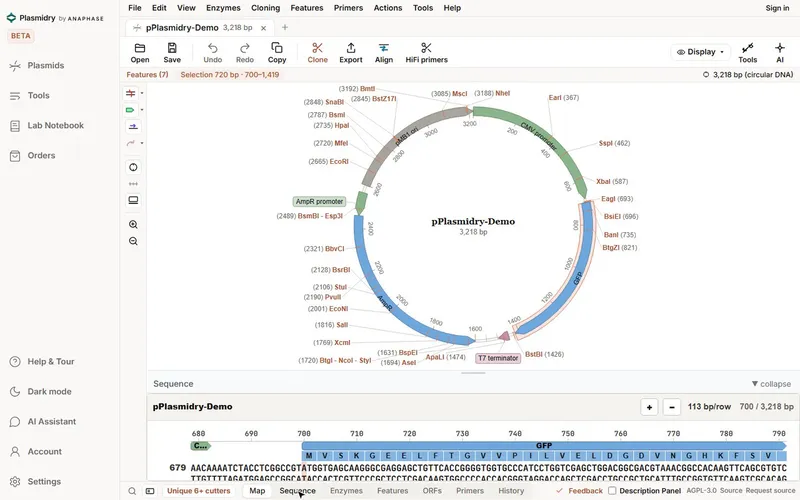
Open a SnapGene .dna, GenBank, FASTA, EMBL or GFF file. The circular map shows features, translations and restriction sites, here the unique 6+ cutters, in Clean, Workbench or Dense mode. Right-click the map to change what it shows. The map also opens at phone width.
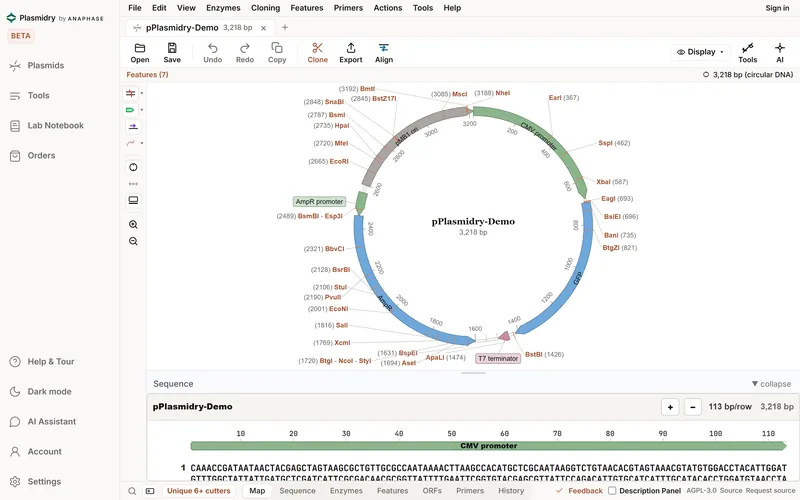
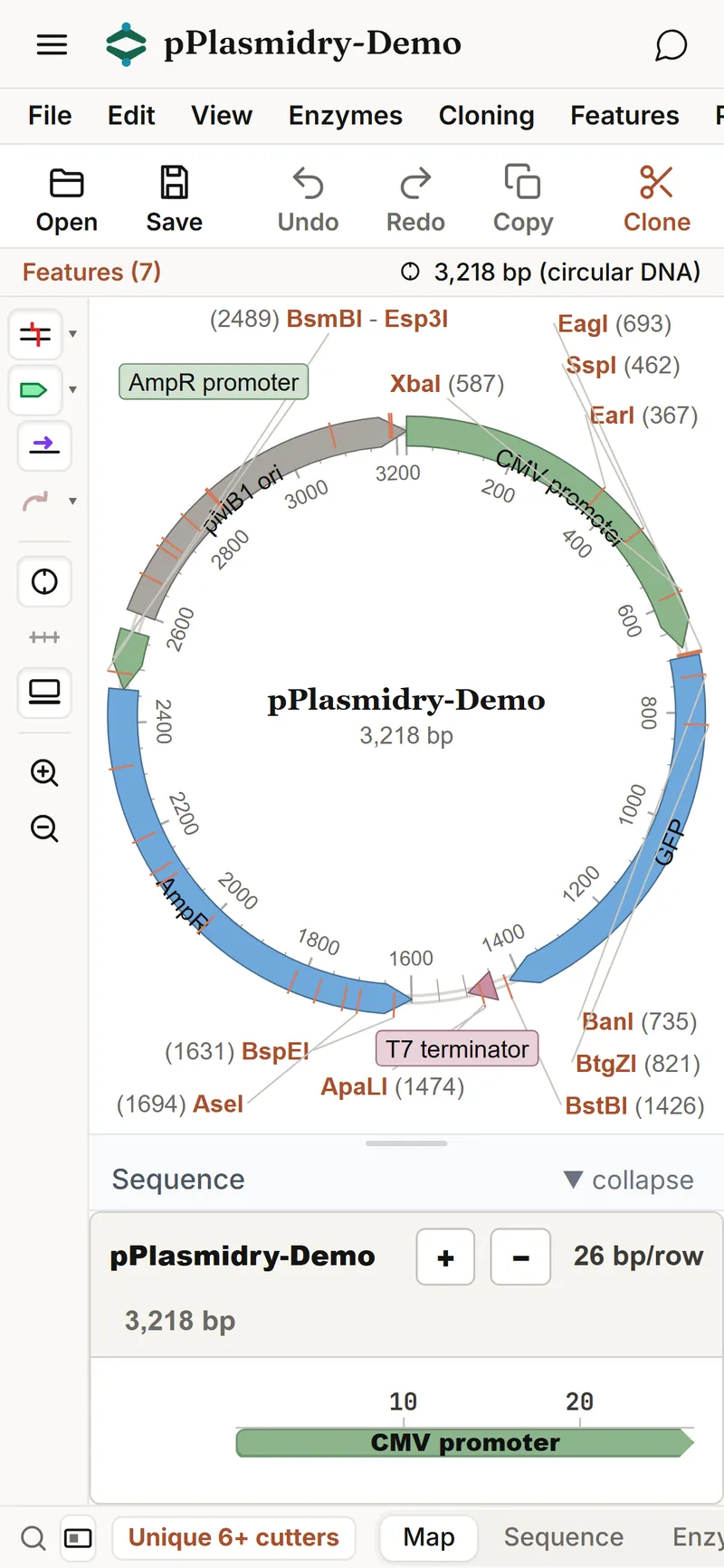
Desktop screenshot
Select a feature and see where it sits.
Click GFP on the map and Plasmidry selects all 720 bp of it, with its type, strand and position, and the sequence strip below jumps to the start codon. The selection follows you between the map and the sequence.
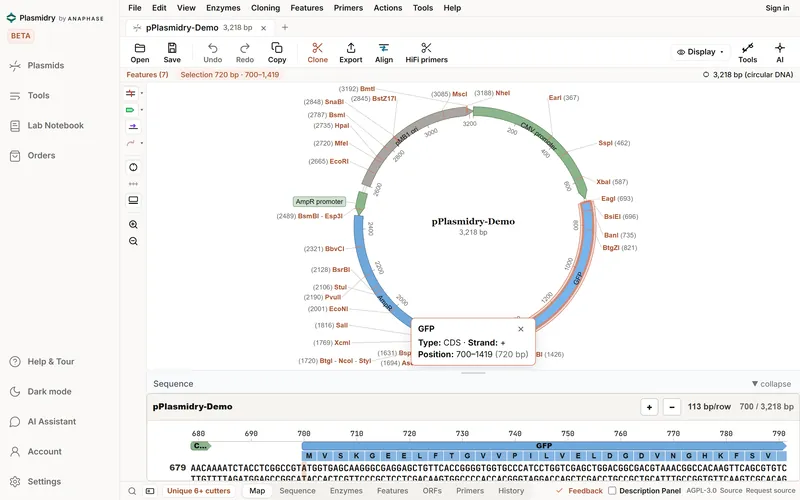
The feature popup and the selection, as Plasmidry shows themGFP
Type: CDS · Strand: + · Position: 700 to 1419 (720 bp)
Selection 720 bp · 700 to 1,419
Full screenshot
Read the sequence with its translation.
The sequence view shows both strands, the features and the translation codon by codon, with restriction sites marked above. A toolbar on the selection gives its length and GC content and lets you copy, BLAST, translate, reverse-complement or turn it into a feature.
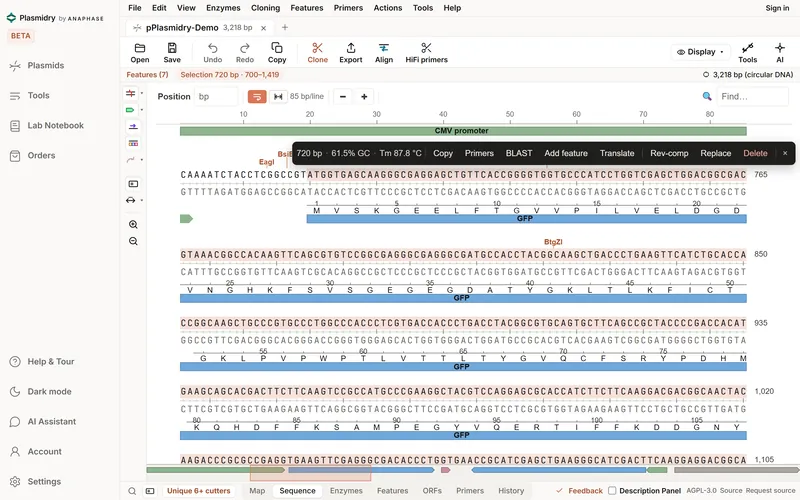
The first ten codons of GFP, positions 700 to 729ATG GTG AGC AAG GGC GAG GAG CTG TTC ACC M V S K G E E L F T
Full screenshot
Design HiFi primers for the insert.
With GFP selected, HiFi primers designs a vector pair and an insert pair, and marks the overlap tails that join them. Each primer is checked and given its length, GC content and Tm.
Tm is calculated by the SantaLucia 1998 nearest-neighbour method, with the parameters shown. Compare with your supplier's calculator before you order.3
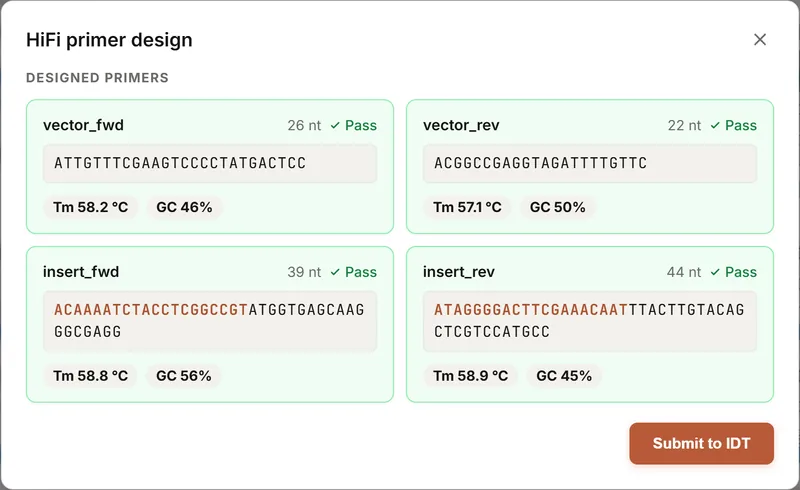
HiFi primer design: designed primers, overlap tails in colour vector_fwd 26 nt · Pass · Tm 58.2 °C · GC 46%ATTGTTTCGAAGTCCCCTATGACTCC vector_rev 22 nt · Pass · Tm 57.1 °C · GC 50%ACGGCCGAGGTAGATTTTGTTC insert_fwd 39 nt · Pass · Tm 58.8 °C · GC 56%ACAAAATCTACCTCGGCCGTATGGTGAGCAAGGGCGAGG insert_rev 44 nt · Pass · Tm 58.9 °C · GC 45%ATAGGGGACTTCGAAACAATTTACTTGTACAGCTCGTCCATGCC
Full screenshot
Plan the sequencing, on the same map.
Plan sequencing primers to cover the construct and they are drawn on the map beside the features, so you can see the coverage before you send anything off. Load the Sanger reads afterwards and align them back to the design.
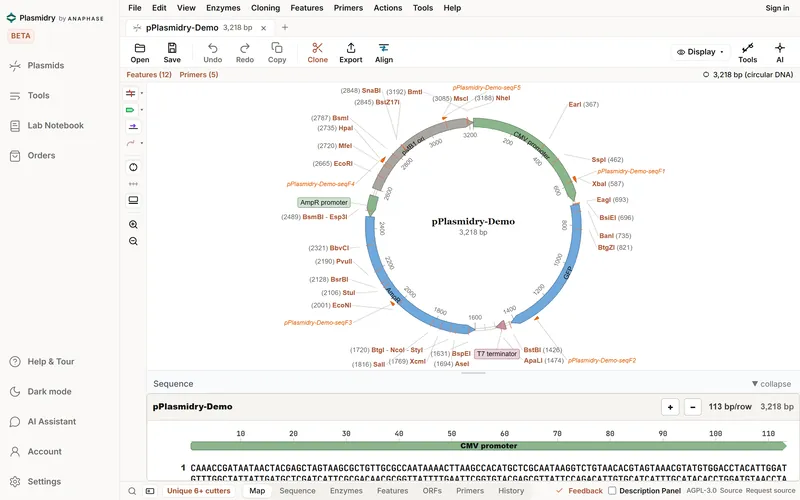
The map header and primer labels, as Plasmidry shows themFeatures (12) · Primers (5)
pPlasmidry-Demo-seqF1 · seqF2 · seqF3 · seqF4 · seqF5
Full screenshot
Figure 2 | A GFP insert in Plasmidry. a, the 3,218 bp demo plasmid on the circular map, on a desktop and at phone width. b, GFP selected on the map. c, the sequence view with its translation. d, HiFi primers designed for the GFP insert. e, five sequencing primers planned and drawn on the map. Outlined boxes mark the area quoted as text. Screenshots of Plasmidry 0.2.0-beta.3 at biosmith.app with its own demo plasmid, cropped, otherwise unretouched.
Opens your SnapGene filesand four other formats
Bring the archive you already have.
- .dnaSnapGene
- .gbGenBank
- .fastaFASTA
- .emblEMBL
- .gffGFF annotations
Plasmidry imports SnapGene .dna, GenBank, FASTA, EMBL and GFF files, and exports GenBank and SVG. The format tests include round trips through reference readers on real plasmids, not only on made-up examples.1
- Sequence, features and annotations from .dna, GenBank, EMBL and GFF files. FASTA brings the sequence.
- The finished map can be saved with the cloning steps that made it, as construct history.
- Plasmidry does not write .dna files. Export is GenBank and SVG.
- Feature round trips are not fully tested yet, there is no import confidence report, and there is no batch import from a folder.
Evidencechecks of 22 Oct 2026
Compared with SnapGene, gaps named.
App shown and live: 0.2.0-beta.3; checks below on 0.2.0-beta.1, 22 Oct; capability table from source commit fc50722, 21 Oct.
Before launch we read the live app and its source, release 0.2.0-beta.1, to check the claims that matter most to someone about to order primers.2
- Every panel that shows a Tm calls the same SantaLucia 1998 calculation and names the method and conditions it used. A test checks that they all return the same number, and its reference values match an independent calculation.
- Features the browser version cannot do, such as ELN export and order tracking, say "Not available in the web app yet" rather than appearing to succeed.
- A BLAST search that fails is reported as a failure, not as "no hits".
- Tm has not been checked against primer3 or against supplier calculators, which use other conditions. Compare before you order.
Every workflow carries a status
The same four words are used in all four Anaphase tools. No Plasmidry workflow is marked Supported, and every cloning workflow is Partial.1
- SupportedEvery evidence category met and owner-approved. None yet.
- ImplementedAvailable, with automated checks; validation partial.
- PartialAvailable, with named gaps.
- Not supportedAbsent, and we say so.
Plasmidry beside SnapGene, workflow by workflow
Status words are Anaphase's own. The gaps column names what Plasmidry's own gap analysis says is incomplete; it does not count SnapGene features.1
| Workflow | Status | Plasmidry has | Named gaps |
|---|---|---|---|
| Circular map | Partial | Clean, Workbench and Dense modes; right-click customisation; feature colour filtering | Label collisions and dense maps not fully solved |
| Linear sequence | Partial | Feature, translation and enzyme overlays | Selection tools and feature editing need polish |
| Feature annotation | Partial | Auto-annotator and a custom feature library | A larger curated mammalian, vector and CAR-T library; library import and export |
| SnapGene file import | Partial | .dna, GenBank, FASTA, EMBL, GFF; round-trip format tests on real plasmids | Batch import from a folder, feature round-trip testing, confidence report |
| Cloning simulation | Partial | HiFi and Gibson, Golden Gate, ligation, Gateway and TOPO, mutagenesis, PCR | End-to-end consistency across tools; richer diagrams |
| HiFi and Gibson check | Partial | An ordered gBlock into a cut vector: overlaps, junctions, frame, internal sites | Multi-fragment workflow, reverse orientation, polished output |
| Golden Gate | Partial | Available | Overhang and fusion-site diagrams, domestication report, part-order view |
| Primer design and Tm | Partial | Primer tools; Tm by SantaLucia 1998 with the parameters shown | Ranking and supplier hand-off; no checks against primer3 yet |
| Restriction analysis | Partial | Enzymes tab and map overlay | Enzyme sets, methylation context, digest view |
| Virtual gel | Partial | Virtual gel in places | A standalone gel tool with realistic settings |
| Alignment and Sanger | Partial | Alignment, Sanger trace alignment and import tools | Smoother post-cloning verification; chromatogram polish |
| Construct history | Partial | The finished map saved with its cloning history | An always-visible timeline; robust saved assembly records |
| Library and sync | Partial | Library kept in the browser; optional sync server with accounts | Account and library views, permissions; cloud storage connectors not switched on |
| AI assistant | Research beta | Your own provider key; consent sheet; answers grounded in the open plasmid | Hosted assistant not yet available |
| Connector and MCP server | Implemented | A local MCP server that reads and edits plasmid files | Not published or deployed; you cannot connect it yet |
AI and connectorsone route today, none required
Ask about the plasmid, keep the arithmetic.
- Your own key
Assistant
Use your own key for Anthropic, OpenAI or OpenRouter, a local Ollama model or a custom endpoint, and pay the provider directly. A consent sheet asks first, before any request leaves your device. Answers are grounded in the plasmid you have open.
- Not switched on
Your Claude or ChatGPT
A connector that lets your own AI agent open, read and edit plasmid files is written and tested, but its server is not deployed, so it cannot be connected today. We will switch it on and say so on the connector page.
- Planned
Hosted assistant
An assistant that does not need your own key is planned and not yet available.
Without a key, there is no AI in Plasmidry. Maps, digests, primers and Tm come from Plasmidry's own code. AI suggestions are drafts for you to check against the sequence.
Limitationswhat it does not do yet
Every paper has a limitations section. Here is ours.
- It is early. Map polish, menus, import and cloning consistency are still being worked on. Try it on one real plasmid alongside your current tool, and tell us where it fails.
- Tm has not been checked against primer3 or supplier calculators yet.
- Order tracking, ELN export and Obsidian export are not available in the browser; the app says so.
- Cloud storage connections (Dropbox, Google Drive, OneDrive) are not switched on yet.
- Windows and macOS installers are not verified, and unsigned builds show SmartScreen or Gatekeeper warnings. Use the browser version.
- The first focus is archive import, HiFi assembly, primer design and verification. It is not a complete molecular biology platform, and In-Fusion is not among its cloning workflows.
- Plasmidry is licensed under AGPL-3.0, but its public source repository is not open yet. Until it is, ask us for the source.
Where your data goes. Your plasmids stay in this browser unless you use the optional sync server (an Anaphase server in Germany, with email and password accounts), run an NCBI BLAST or E-utilities search (sent to NCBI), or make an AI request (sent to the provider you choose, after the consent sheet). No telemetry and no first-party cookies. Keep a GenBank copy of anything that matters.
Questionsbefore you open it
Frequently asked questions.
Is it free?
Yes, during the research beta, with no card and no account. Draft prices for paid plans start at £129 a year for one academic seat. They may change and there is no checkout yet. Draft pricing.
Why is it at biosmith.app?
Plasmidry was called BioSmith until 23 October 2026. The live app is still served from biosmith.app, its current address, until Plasmidry has a domain of its own.
Will it open my SnapGene files?
It imports .dna files with their features, as well as GenBank, FASTA, EMBL and GFF. It does not write .dna: export is GenBank and SVG. Feature round trips are not fully tested yet, so check a construct you know first.
How far can I rely on the Tm?
Plasmidry uses the SantaLucia 1998 nearest-neighbour method in every panel and shows the conditions it assumed. It agrees with an independent implementation of the same method, but has not been checked against primer3. Supplier calculators use different salt and primer conditions, so compare with yours before you order.3
Do I need to install anything?
No. Plasmidry runs in a current desktop browser, and the map also opens at phone width. Desktop installers exist but are not yet verified.
Is it open source?
It is licensed under the GNU AGPL-3.0, and commercial licence terms are available from Anaphase for organisations that cannot use the AGPL. The public source repository is not open yet; until it is, ask us for the source.
Can I use it for clinical work?
No. Plasmidry is a research beta, for research use only, and not for clinical, diagnostic or treatment decisions.
References
- Plasmidry one-pager and workflow comparison with SnapGene, version 0.3, 23 October 2026, describing source commit fc50722. Status words assigned under the Anaphase copy standard; none is Supported.
- Plasmidry due-diligence pass, 22 October 2026: the live app and source of release 0.2.0-beta.1 (commit 7472b5f) read for the Tm calculation and its parity test, unsupported features and BLAST error handling.
- SantaLucia J. A unified view of polymer, dumbbell, and oligonucleotide DNA nearest-neighbor thermodynamics. Proc Natl Acad Sci USA 1998; 95: 1460-1465.
Try it on one real plasmid.
Open the demo plasmid, or open a .dna or GenBank file from your own archive and check it against the tool you use now.